WebUI Client (wasmosbxl)
Run a native C++ ultra-fast Excel-compatible editor & viewer inside a single browser <canvas> element. Next-generation client-side Web spreadsheet with zero server round-trips.
WebAssembly-Native Excel UI Embeddable in Your Web App in Just a Few Lines
Alongside its core Excel calculation and report generation engine, wasmosbxl (v2.2) now includes a full-featured WebUI Client that renders and operates an interactive spreadsheet GUI directly in the browser.
Unlike traditional DOM-based JavaScript grid libraries that struggle with large sheets, native C++ (WebAssembly) + WebGL2 / SDL3 hardware-accelerated rendering delivers 60fps responsiveness and 100% faithful Excel visual fidelity even on complex workbooks.
<canvas> element and call Module.startGrid("#canvas"). Easily integrates into React, Vue, Next.js, or plain HTML.
Excel files, and export high-precision PDFs entirely inside browser memory without uploading sensitive files to any server.
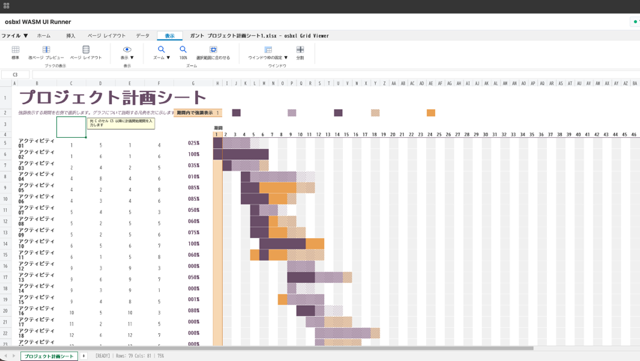
WebUI Client Live Browser Preview
From the full Ribbon menu (File, Home, Insert, Page Layout, Data, View) and formula bar to Gantt charts powered by conditional formatting and pattern fills, data validation tooltips, and sheet tabs—everything runs natively inside the browser's <canvas>.
Key Capabilities of the WebUI Client
- • Excel-style Ribbon tabs and interactive toolbars
- • Normal View / Page Break Preview / Page Layout View (with direct Header & Footer editing)
- • Freeze Panes and Split Window support
- • Zoom controls (Fit to Selection, 100% toggle) with crisp Retina / High-DPI scaling
- • Undo / Redo history management
- • Fonts, borders, pattern fills, gradients, merged cells, and text rotation
- • Conditional Formatting (Data Bars, Color Scales, Icon Sets, formula rules manager)
- • Interactive Charts, Sparklines, and PivotTables
- • AutoShapes, Pictures, SmartArt, Slicers, and Timelines
- • AutoFilter (value/text conditions & color filter) and Custom Sort
- • Data Validation (in-cell dropdown lists, input prompts, and error alerts)
- • Data Connect Wizard & Taskpane (fetch and refresh data from REST APIs)
- • Programmatic control from JavaScript via
ui.GridViewandui.GridModel
Why Choose the osbxl WebUI Client
1. Embed Familiar Excel Workflows Directly Inside SaaS & Enterprise Web Apps
Embed project schedules (Gantt charts), budgeting sheets, quotes/invoices, and shift planners directly into your web application—allowing users to edit, recalculate, and export PDFs without leaving the browser.
2. Hybrid Reporting Architecture with Backend (Python / Java / Node.js / PHP)
Generate data-populated .xlsx reports in milliseconds on the server using osbxl, then preview, fine-tune, and export PDFs on the frontend with wasmosbxl WebUI Client—backed by 100% identical calculation and rendering accuracy.
3. Zero-Trust Client-Side Processing & External System Integration
All formula evaluations, layout rendering, and PDF generation run strictly inside the user's browser sandbox (WebAssembly memory), ensuring confidential financial or HR spreadsheets never leave the client device.
Because osbxl supports external web system integration via Excel Add-ins, you can seamlessly connect with your internal web applications, Slack, or batch workflows!