GUI Editor & Viewer
Native C++ ultra-fast Excel spreadsheet engine delivered in an intuitive desktop GUI. Fully supported on Linux, macOS, and Windows.
Lightweight Excel-Compatible GUI Running Smoothly on Linux Desktops
A lightweight, native Excel-compatible spreadsheet GUI application without the burden of launching heavy office suites.
Fully powered by the osbxl core engine, faithfully rendering nearly 500 calculation functions, real-time formula evaluation, charts, and cell formatting.
Delivers identical visual fidelity and responsive performance across Linux, macOS, and Windows.
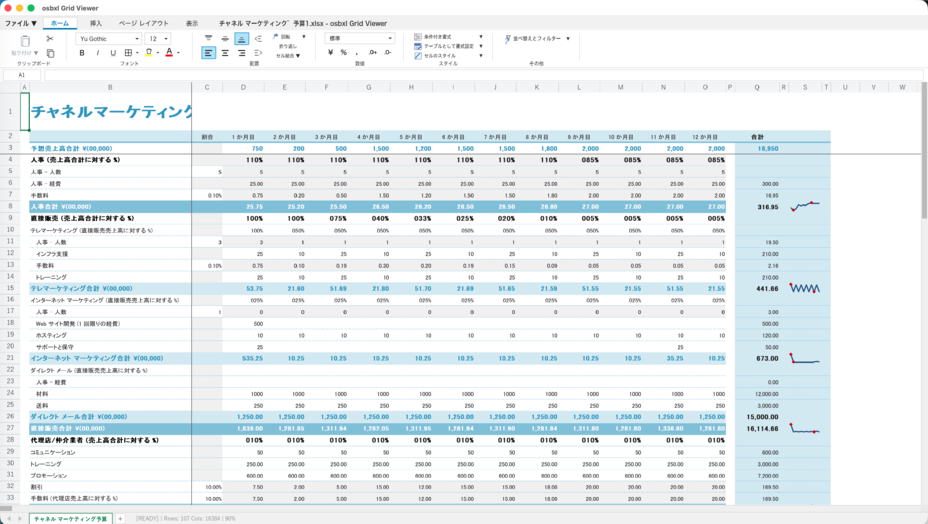
GUI Editor Interface Preview
Faithfully preserves complex layouts, themes, sheet tab switching, chart rendering, and formula calculations with the exact same speed and responsiveness on Linux desktops.
Why Choose osbxl GUI Editor
1. No Heavy Office Suite Required — Ideal for Linux Workstations
Launching a heavy office suite just to inspect or make minor adjustments to spreadsheets on Linux incurs significant overhead. osbxl GUI Editor starts up in milliseconds with minimal RAM, providing a clean, distraction-free environment.
2. 100% Identical Calculation & Rendering to the Backend Engine
Powered by the exact same engine running your Python, Java, Node.js, PHP, and WebAssembly backend workloads, eliminating any discrepancies between automated batch generation and desktop inspection.
3. Comprehensive Excel Compatibility
Borders, fills, font styles, numeric/date formatting, column/row auto-fit and manual resizing, merged cells, sheet tabs, and interactive charts are fully supported out of the box.